No lock-in
Out the door as a Custom GPT, Project, Skill, or Gem.
You built it here. Now take it anywhere — without rebuilding it from scratch in another tool's format.
Free forever · No credit card required
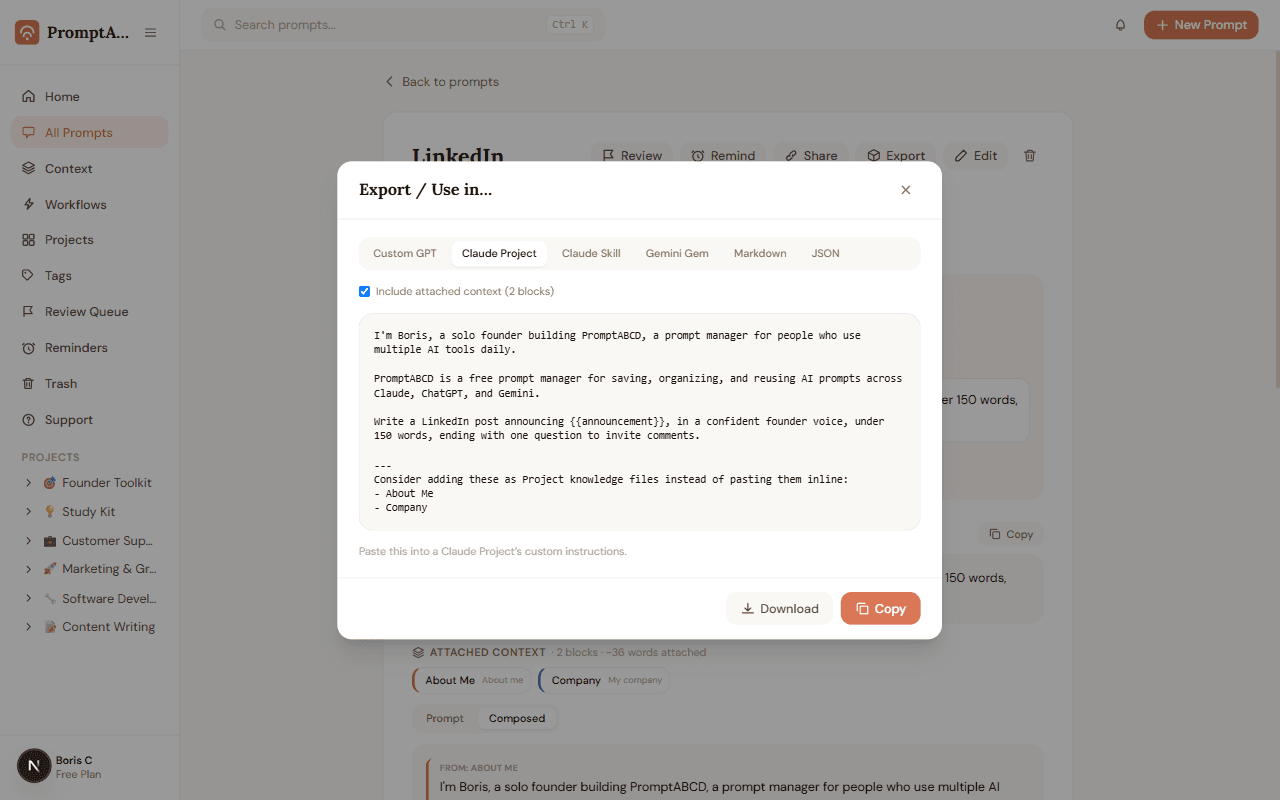
One prompt, every tool's format. Tap a destination and watch it reshape.
I'm a marketing manager at a B2B SaaS company. I write most of our outbound emails myself.

Warm, direct, no jargon. We avoid hype, buzzwords, and exclamation points.

Rewrite this cold email to sound warm and human while keeping it under 90 words.
Paste this into your Custom GPT’s Instructions field in the GPT builder.
How it works
One prompt. Every destination's format.
Pick a format, see the live preview, copy or download. No model calls, nothing sent until you choose to.
Export Anywhere
Switch formats, preview morphs instantly
A segmented control switches between formats; the preview re-renders live so you always see exactly what you're about to copy or download.
- Build once, with your context attached
- Export to Custom GPT, Claude Project, Claude Skill, Gemini Gem, Markdown, or JSON
- A character-count meter warns you near format limits — never blocks copy
FAQ
Export Anywhere — frequently asked questions
Which formats can I export to?
Custom GPT instructions, a Claude Project, a Claude Skill (SKILL.md), a Gemini Gem, plain Markdown, or JSON. Switch formats and the preview updates instantly.
Does exporting include my attached context?
Yes, by default — toggle it off if you want the prompt alone. Either way, the preview shows exactly what will be copied or downloaded before you commit to it.
Does this call any AI model?
No. Export Anywhere is a pure formatting layer — it reshapes text you already wrote, with no model calls and nothing sent anywhere until you copy or download.
Turn a prompt into a Custom GPT in 30 seconds
Free forever — no credit card required.