A to Z of prompts, in one place.
Save your AI prompts once. Find them in seconds. Reuse them forever.
PromptABCD is where your prompts live, grow, and get sharper. Organized by project. Backed by learning. Built for people who take AI seriously.
Free forever · No credit card required · See how it works ↓
Try it — no signup
Fill the blanks. Get a ready-to-use prompt.
This is a real prompt template. Pick a topic and an audience, then copy the finished prompt into any AI.
Create a detailed outline about remote work aimed at beginners. Include a hook and 4-6 sections.
Pick a topic and an audience below — or hit Shuffle.
How it works
From scattered notes to a system that remembers.
Capture what works, organize it once, reuse it forever — across Claude, ChatGPT, Gemini, and beyond.
01
Capture
Paste it, import a hundred, or build one in seconds.
02
Organize
Projects, folders, tags.
03
Reuse
Ctrl+K, copy, paste — anywhere you work.
Paste it, import a hundred, or build one in seconds.
Projects, folders, tags.
Ctrl+K, copy, paste — anywhere you work.
Ctrl + K
Any prompt, two keystrokes away.
Search, hit enter, paste. Here's exactly what that feels like.
Every prompt remembers where it came from.
Save your context once — who you are, what you do, who you're writing for — and attach it to any AI prompt in your library.
Learn more about Context BlocksWorks everywhere
One prompt library. Every AI you use.
Claude, ChatGPT, Gemini, Grok, Perplexity, Copilot — your prompts work the same everywhere, because they're just text.
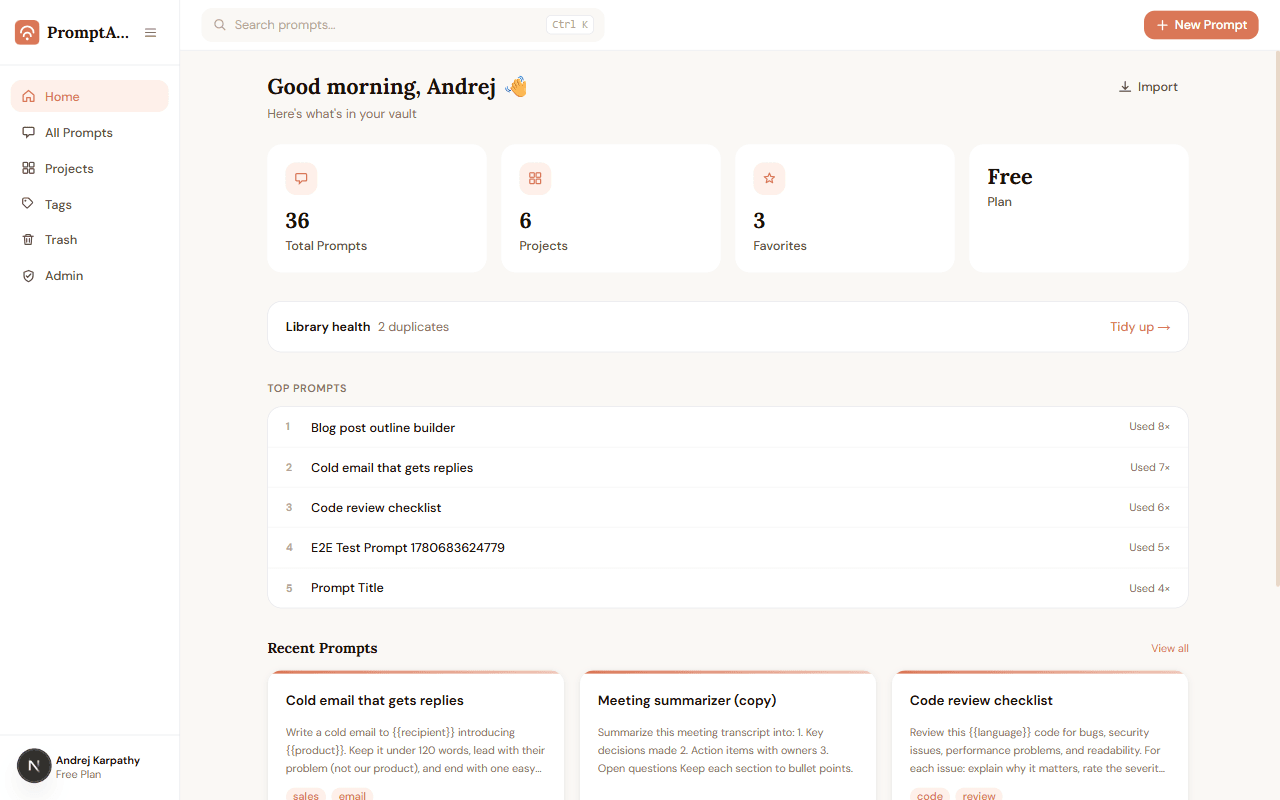
Your whole prompt library, at a glance — most-used prompts and what you saved last.
Works with your favorite AI tools
Use cases
Made for the way you work
However you use AI, the pattern is the same: your best prompts deserve a home.
Content writers
Keep outline, intro, and rewrite prompts as templates — swap the {{topic}} and publish faster, in a consistent voice.
Developers
Save code-review, debugging, and explain-this prompts per language. Copy them mid-flow with Ctrl+K without leaving the keyboard.
Marketers
One proven prompt per channel — cold email, LinkedIn, ad copy. Save your brand voice once as a Context Block and attach it to every channel prompt.
Students
Build a personal study kit: explainers, quiz makers, summarizers. Rate what works and reuse it every exam season.
Founders & teams
Stop pasting prompts into Slack. Share a link instead — teammates copy the latest version, you keep one source of truth.
Customer support
Templates for apologies, follow-ups, and tricky conversations — fill in the customer's details and send with confidence.
2 keystrokes
from anywhere in the app to any prompt, copied
100 prompts
imported in a single paste, duplicates flagged
30 days
of protection for anything you delete
7 AI models
of results stored side by side on a single prompt
20 versions
of every prompt kept, restorable in one click
6 export formats
Custom GPT, Claude Project, Skill, Gemini Gem, Markdown, or JSON
3 context fields
document what a prompt solves, needs, and returns
1 click
revokes a share link instantly, any time
Free forever
to get started — no credit card required
Learn prompt engineering — free, from zero
Every lesson ends with a hands-on exercise, not a passive read. No signup needed to start.
Built to actually teach
Every concept opens with a wrong-way example. You see the mistake before you learn the fix — the fastest way to build real intuition.
Zero to advanced, one arc at a time
Structured arcs, each one building on the last — from your first prompt to orchestrating multi-step AI workflows.
Learn it here. Use it anywhere.
Techniques transfer across Claude, ChatGPT, Gemini, and Grok. The skill is yours — portable, permanent, and completely free.
Features
Your prompts, working for you
What PromptABCD does that a notes app never will.
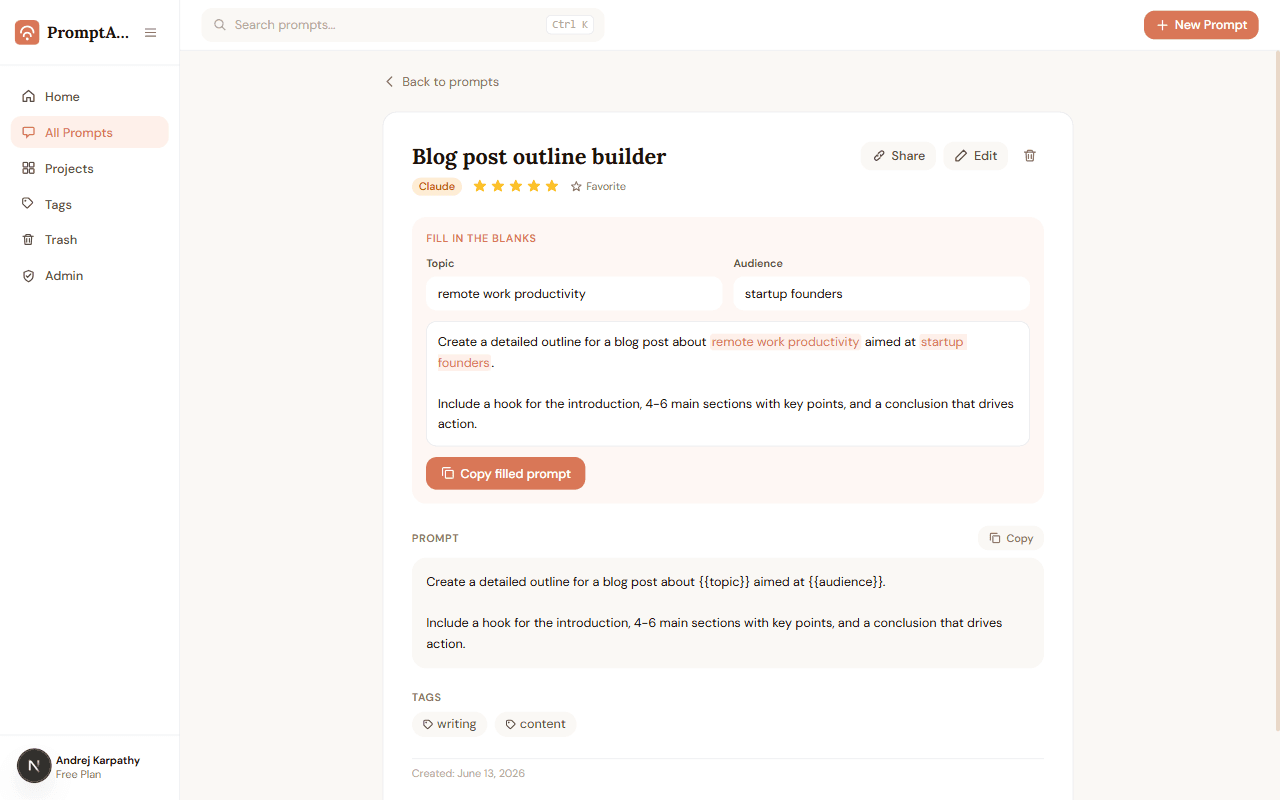
Fill-in-the-blank templates
Write it once. Reuse it forever.
Wrap any word in {{double braces}} and it becomes a fillable blank. Next time, type the new value, watch the live preview, and copy the finished prompt in seconds.
- Variables like {{topic}} become labeled input fields automatically
- Live preview shows your finished prompt as you type
- One click copies the filled-in result
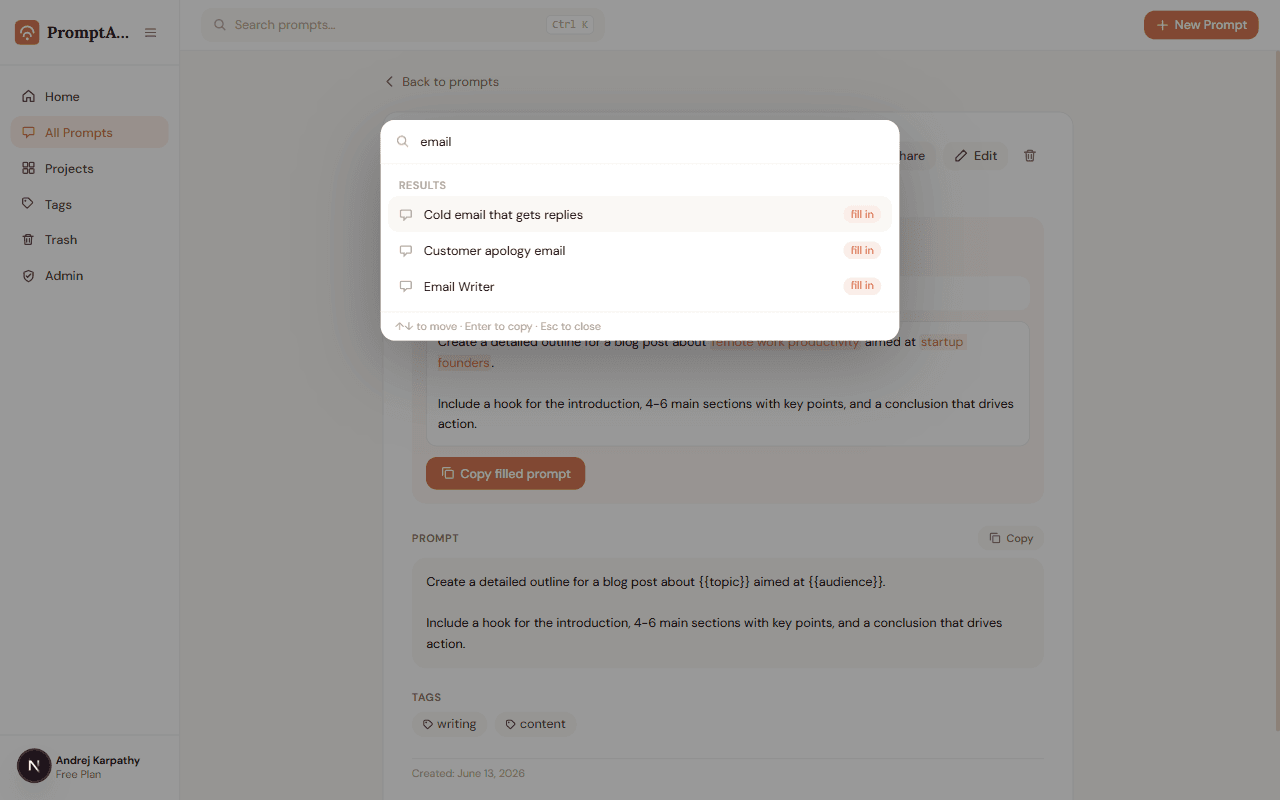
Ctrl+K command palette
Any prompt, two keystrokes away.
Press Ctrl+K anywhere in the app, type a few letters, hit Enter — the prompt is on your clipboard. No clicking through folders, no scrolling.
- Instant search across your whole library
- Enter copies the prompt straight to your clipboard
- Recent and most-used prompts appear before you even type
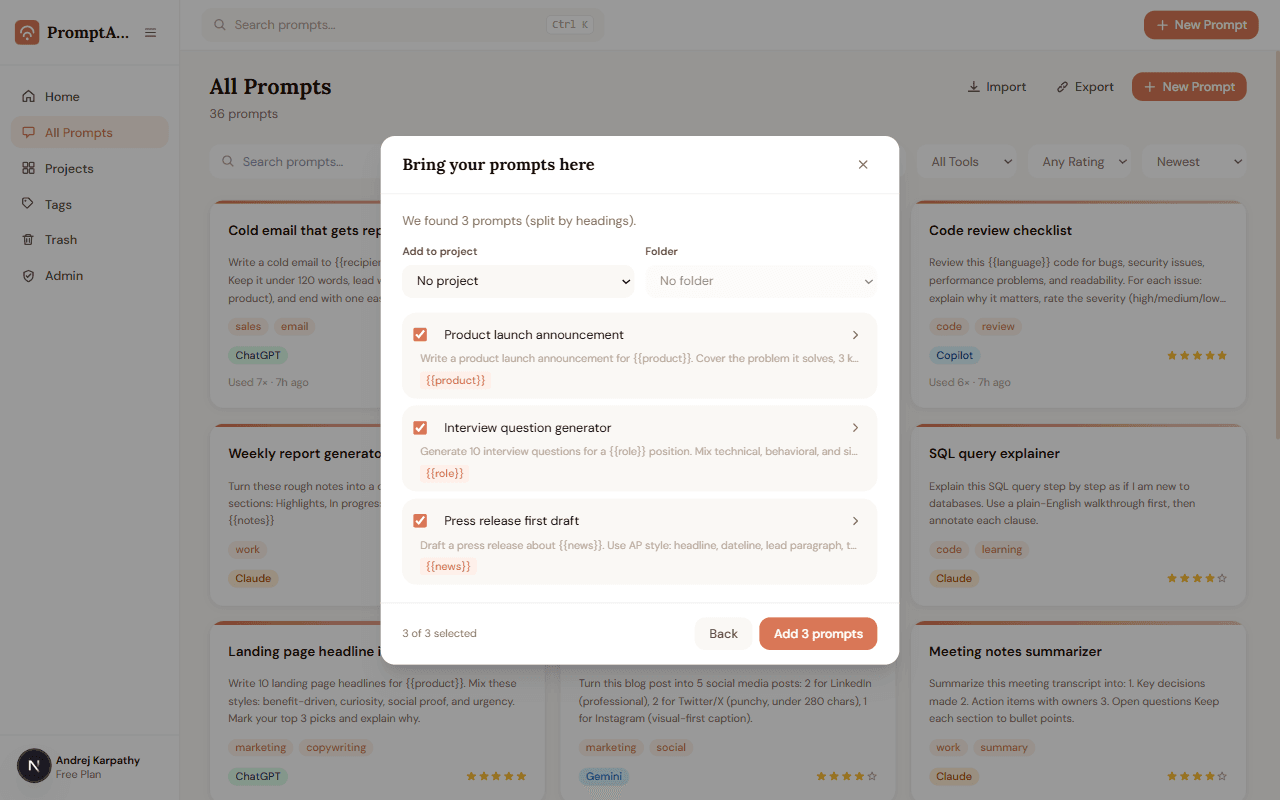
Bulk import
Bring every prompt you already have. In one paste.
Your best prompts live in Notes, Docs, and old chats. Paste them all at once — PromptABCD splits them into individual prompts, flags duplicates, and imports up to 100 in one go.
- Auto-splits by headings, --- lines, or blank lines
- Reads ChatGPT export files too
- Review everything before anything is saved
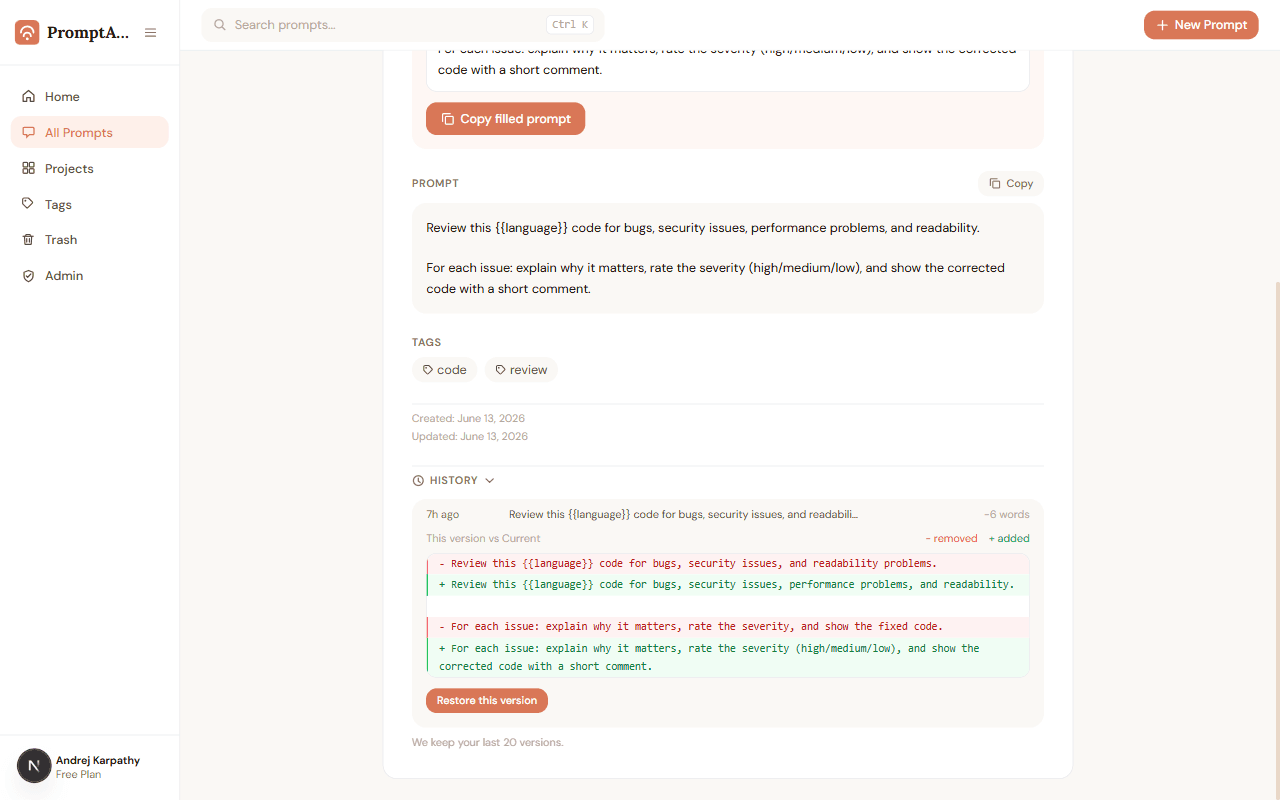
Version history
Every edit saved. Nothing ever lost.
Each time you change a prompt's text, the previous version is kept automatically. Compare versions side by side and restore any of them — restoring is itself undoable.
- Color-coded diff shows exactly what changed
- Restore any of your last 20 versions in one click
- Metadata edits never clutter your history
Share links
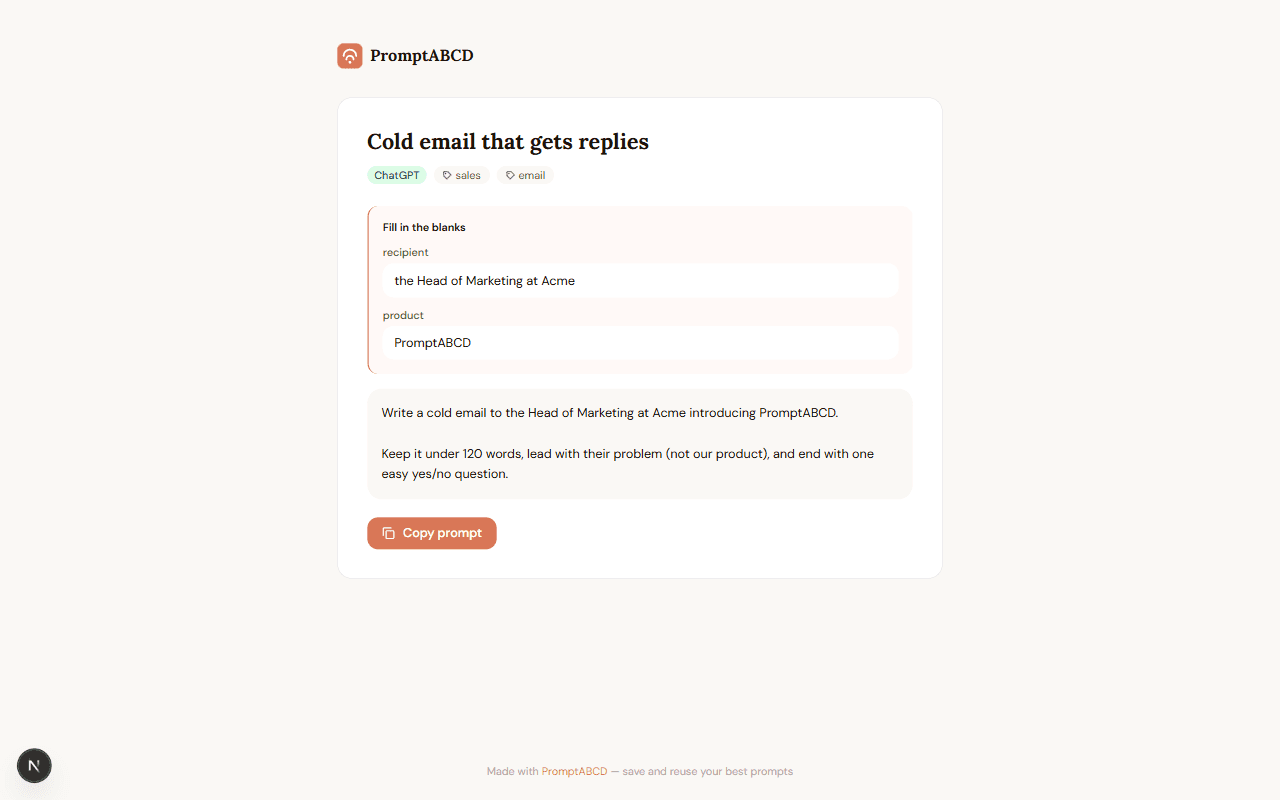
Send a prompt as a link, not a wall of text.
Flip one switch and any prompt gets a clean public page with a copy button. Your results, notes, and name stay private — and the link dies the moment you turn it off.
- Visitors can fill in the blanks and copy — no account needed
- Only the prompt text, tags and tool are ever shown
- Revoke instantly, any time
Reusable context
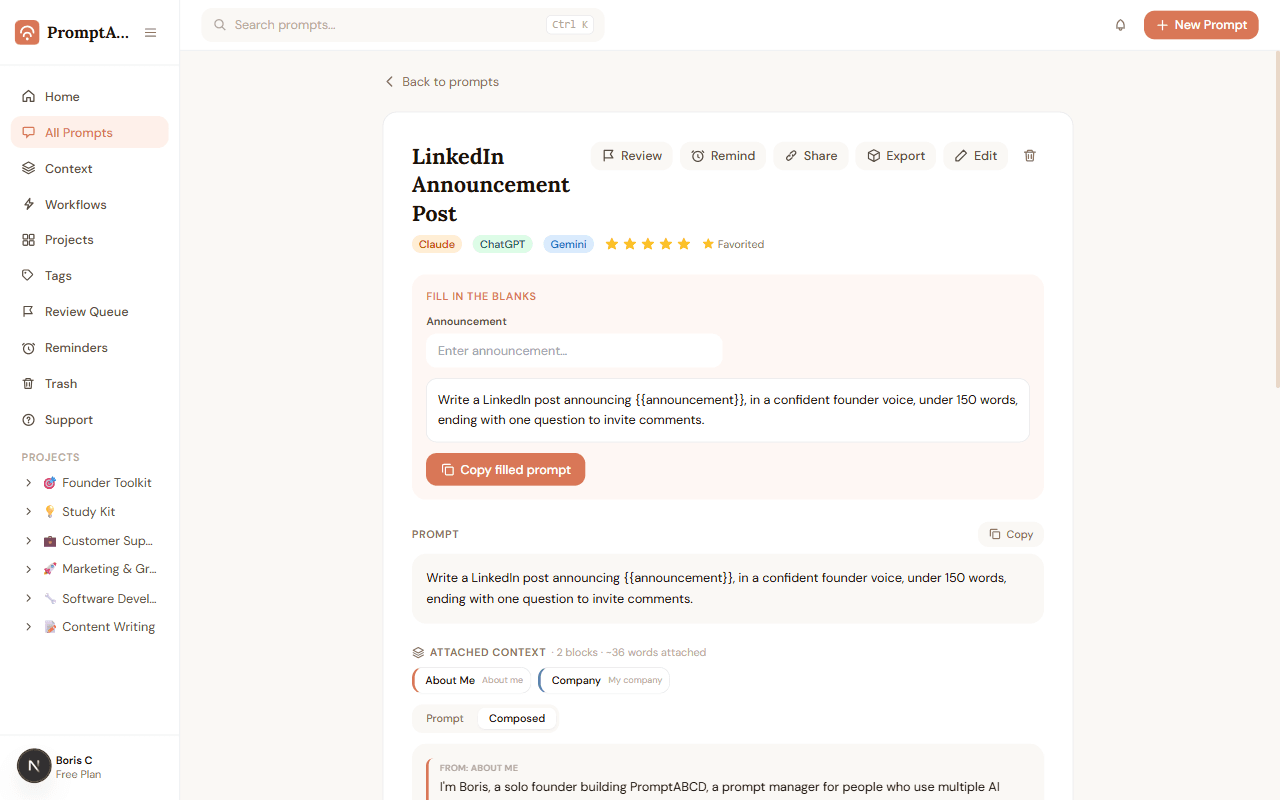
Save your context once. Reuse it everywhere.
Save things like "about me", your company, and your audience as Context Blocks. Attach them to any prompt, and copy both together — color-keyed so you can see exactly where each line came from.
- Save about-you, company, or audience info as reusable blocks
- Attach any combination of blocks to a prompt, in any order
- Copy prompt + context together with one click
No lock-in
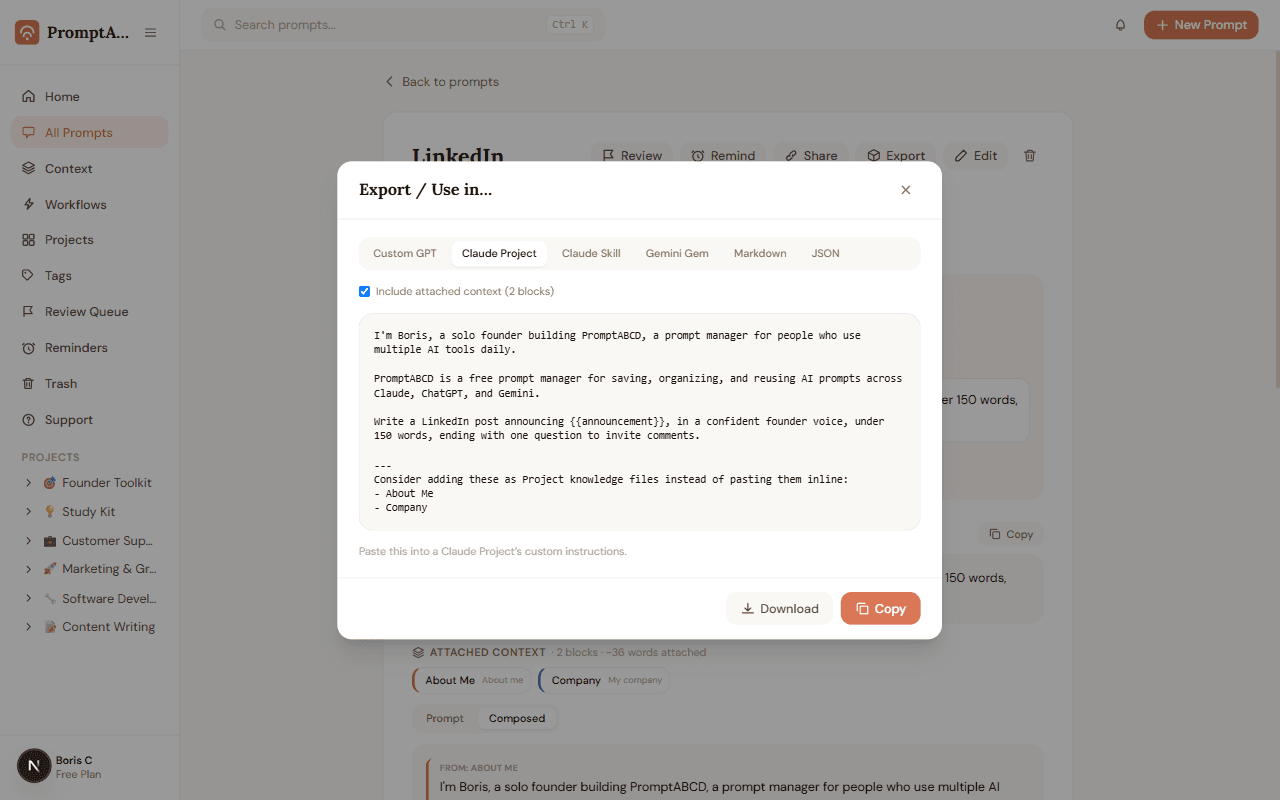
Out the door as a Custom GPT, Project, Skill, or Gem.
Build a prompt once, with its context — then export it to the exact format your destination tool expects, no manual reformatting.
- Build once with your context attached
- Export to Custom GPT, Claude Project, Claude Skill, Gemini Gem, Markdown, or JSON
- One source of truth, no copy-paste reformatting
And everything around them
The quiet details that keep a prompt library useful for years, not weeks.
Trash & Undo
Deleted prompts wait safely in Trash for 30 days. Restore in one click — or hit Undo right away.
Tag Manager
Rename or merge tags across your whole library in seconds. "book" and "books" finally become one.
Usage tracking
See how often each prompt is used, sort by most-used, and spot the ones earning their keep.
Export & Backup
Download your whole library as Markdown or JSON any time. Your prompts are yours.
Guided Prompt Builder
New to prompting? A step-by-step builder turns a plain sentence into a well-structured prompt.
Usage Context
Document what a prompt solves, what it needs as input, and what it returns — so you can reuse it confidently weeks later.
Version Changelog
Add a reason note each time you change a prompt's text. See your change notes in Version History alongside the diff.
Review Queue
Flag prompts that are outdated or need work. They land in a dedicated Review Queue — work through them at your own pace.
Multi-Model Results
Store responses from Claude, ChatGPT, Gemini, and more — all on one prompt. Compare outputs side by side and keep the best one.
Support Center
Stuck or found a bug? Submit a ticket in seconds and track its status without leaving the app.
How it works
From scattered to sorted, in 3 steps
Capture
Paste a prompt that worked, import a hundred at once, build one step by step with the guided builder, or install the Chrome extension and save directly from ChatGPT, Claude, or Gemini.
Organize
Drop prompts into projects and folders, tag and rate them.
Reuse
Ctrl+K, type, Enter — copied, with its context attached. Fill in the blanks for templates, or export it to any tool.
Read the full guide — every feature explained in plain words →
FAQ
Frequently asked questions
Everything you need to know about managing your AI prompts with PromptABCD.
What is PromptABCD?+
PromptABCD is the fastest way to find, manage, and master AI prompts - for free. Browse a free prompt library, learn prompt engineering, and manage your own collection of prompts organized into projects and folders. Tag, rate, turn them into fill-in-the-blank templates, and find any prompt in seconds with Ctrl+K search.
Is PromptABCD free to use?+
Yes. PromptABCD is free forever to get started — no credit card required. You can create an account and begin saving and organizing your prompts right away.
Which AI tools does PromptABCD support?+
PromptABCD works with every major AI assistant, including Claude, ChatGPT, Gemini, Grok, Perplexity, and GitHub Copilot. Your prompts are plain text — copy them into any tool. You can also store responses from multiple models per prompt, so you can compare what Claude vs. ChatGPT produced for the same instruction.
Can I store results from multiple AI models for the same prompt?+
Yes. Each prompt can hold up to 7 results from different AI assistants. After running a prompt in Claude, ChatGPT, or Gemini, paste the response back into PromptABCD and select the model it came from. All results appear on the prompt detail page, each labeled with its model badge — so you can compare outputs and keep the best one.
How does bulk import work?+
Paste anything — notes, docs, even a ChatGPT export file — and PromptABCD automatically splits it into individual prompts using headings, separator lines, or blank lines. You review the list, untick anything you don't want, and import up to 100 prompts in one go. Duplicates are detected and flagged automatically.
What are fill-in-the-blank templates?+
Write {{topic}} (double curly braces) anywhere in a prompt and PromptABCD turns it into a fillable field. Next time you use the prompt, just type the new value, watch the live preview update, and copy the finished prompt — no more hunting through a wall of text to change one word.
What happens if I delete a prompt by accident?+
Nothing is lost. Deleted prompts move to Trash, where they wait for 30 days before being removed for good. You can restore them with one click — and right after deleting, an Undo button appears too.
Can I share a prompt with someone who doesn't have an account?+
Yes. Every prompt can get a private share link. Anyone with the link sees a clean read-only page with a copy button — they never see your results, notes, or name. Turn the link off any time and it stops working immediately.
Can I export my prompts?+
Always. Download your entire library as a readable Markdown document or a JSON file in one click. Your prompts are yours — there is no lock-in.
How do I organize my AI prompts?+
Organize prompts into projects and folders, add 1–5 star ratings, and apply tags. A built-in tag manager lets you rename or merge tags across your whole library.
Is my data private?+
Yes. Your prompts are private to your account by default. The only thing ever visible to others is a prompt you explicitly share via a link — and even then, only the prompt text, tags, and tool are shown, never your results, notes, or identity.
What is the Review Queue?+
The Review Queue is a maintenance page for prompts you know need updating but don't have time to fix right now. Click the flag icon on any prompt to mark it for review — it appears in the Review Queue in the sidebar. When you're ready, edit or clear each one. Nothing is ever deleted automatically.
What is Usage Context?+
Usage Context is three optional fields you can add to any prompt: what problem it solves, what inputs it needs, and what output it produces. These appear on the prompt detail page below the prompt text. When you return to a prompt weeks later, Usage Context tells you exactly how to use it — no guessing.
Can I document why I changed a prompt?+
Yes. When you edit a prompt's text in the edit form, a "Reason for this change" field unlocks. Add a short note — "Updated for new model behavior" or "Tested, doesn't work for short articles" — and it's stored with that version in Version History alongside the usual color-coded diff.
Can I save reusable context, not just prompts?+
Yes. Context Blocks let you save things like "about me", your company, and your audience once, attach them to any prompt, and copy both together — so you stop re-typing the same background into every chat.
Can I turn a prompt into a Custom GPT or a Claude Project?+
Yes. Export Anywhere turns any prompt — with its attached context — into ChatGPT Custom GPT instructions, a Claude Project or Skill, a Gemini Gem, or plain Markdown/JSON. One source of truth, no lock-in.
Is my saved context private?+
Always. Context Blocks are private to your account, never appear on public share links, and are only ever sent somewhere when you explicitly copy or export them.
Do I need ChatGPT Plus or a paid AI subscription to use PromptABCD?+
No. PromptABCD stores and organizes the text of your prompts — it works just as well with the free tier of ChatGPT, Claude, Gemini, or any other AI tool. You copy a prompt from PromptABCD and paste it wherever you already chat.
How should I organize a large prompt library so it doesn't become a mess?+
Keep it simple: create 5–10 top-level projects around what you actually do (writing, code, marketing, study) rather than which AI tool you used, then use folders inside a project for sub-topics and tags for cross-cutting labels like "client work" or "needs review". Search and Ctrl+K do the rest, so you don't need a deep folder tree.
Can I use the same prompt across ChatGPT, Claude, Gemini, and other AI tools?+
Yes. Every prompt in PromptABCD is plain text, so it works in any AI tool you paste it into. You can also label which tool you usually run a prompt in, and store results from up to 7 different models on the same prompt to compare them.
Is PromptABCD a browser extension?+
PromptABCD is primarily a web app — sign in anywhere and your full library, version history, and settings are there, accessible in two keystrokes with Ctrl+K. There is also a free Chrome extension that adds a side panel to ChatGPT, Claude, and Gemini, so you can save prompts and insert them without switching tabs. The web app and extension share the same account.
What does the Chrome extension add that the web app doesn't have?+
The extension lives inside your AI tab as a side panel, so you never have to switch windows to find or reuse a prompt. You can save any message from ChatGPT, Claude, or Gemini with one hover-and-click — including AI replies, not just your prompts. You can also right-click any selected text on any website and save it instantly. The web app is where you organise and manage your full library; the extension is how you interact with it in real time while using AI tools.
How is PromptABCD different from keeping prompts in Notion or Google Docs?+
A generic doc can hold prompts, but it won't turn {{variables}} into fillable fields, track versions with diffs, remind you to revisit a prompt, or store results from multiple AI models side by side. PromptABCD is purpose-built for prompts, so those things work out of the box instead of needing a manual template you maintain yourself.
Can I use PromptABCD with my team at work?+
You can share any individual prompt with teammates via a read-only link — no account needed on their end. PromptABCD doesn't yet have shared team workspaces with multiple editors on one library; today, each person keeps their own account and shares links for the prompts that matter.
Does PromptABCD have a public API for developers?+
Not at this time. PromptABCD is currently a web app for managing prompts by hand — there's no public API for programmatic access. You can always get your data out via the Markdown or JSON export.
Can I access PromptABCD on my phone?+
Yes. PromptABCD is a responsive web app — open it in your phone's browser and sign in, no native app to install. Your library, search, and Ctrl+K-style quick actions work the same as on desktop.
How many folders or projects should I create for my prompts?+
Start with one project per area of your life or work — most people land on somewhere between 3 and 10. Use folders inside a project only once it has enough prompts that scrolling gets annoying; tags and the Ctrl+K search cover the rest, so you don't need to over-plan the structure upfront.
Can I see which of my saved prompts I actually use the most?+
Yes. PromptABCD tracks how often each prompt is copied and lets you sort your library by most-used. It's an easy way to spot your highest-value prompts — and notice the ones nobody's touched, which are good candidates for the Review Queue or Trash.
Your next great prompt deserves a home
Set up in under a minute. Import what you have, and never start from a blank page again.
Create your free account